

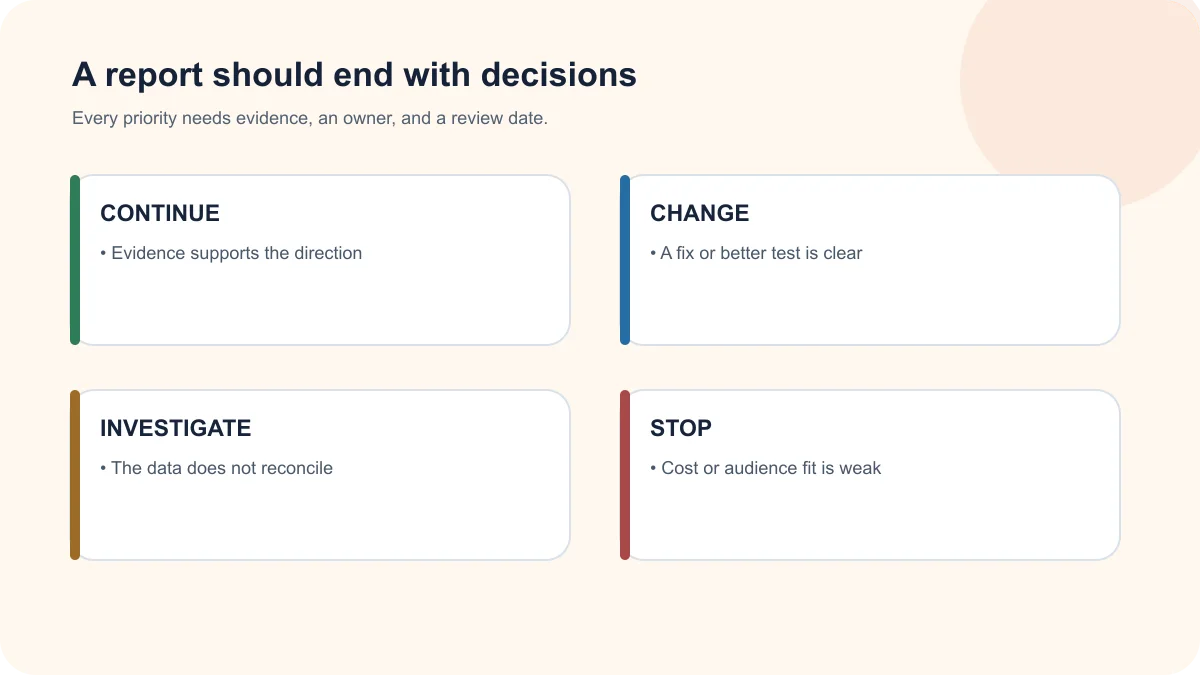
A digital marketing report for small business should help an owner decide what to continue, change, investigate, or stop. It should connect visibility and traffic to inquiries and sales feedback. A report that only lists posts, impressions, clicks, and followers may describe activity without proving business value.
Quick answer
A useful monthly report includes goals, qualified-lead definitions, channel results, important landing pages, conversion-path checks, advertising costs, lead quality, sales feedback, risks, actions completed, and next-month priorities. It should explain what changed and why—not simply export charts from several platforms.
TLDR
- Start with the business outcome and agreed definition of a qualified inquiry.
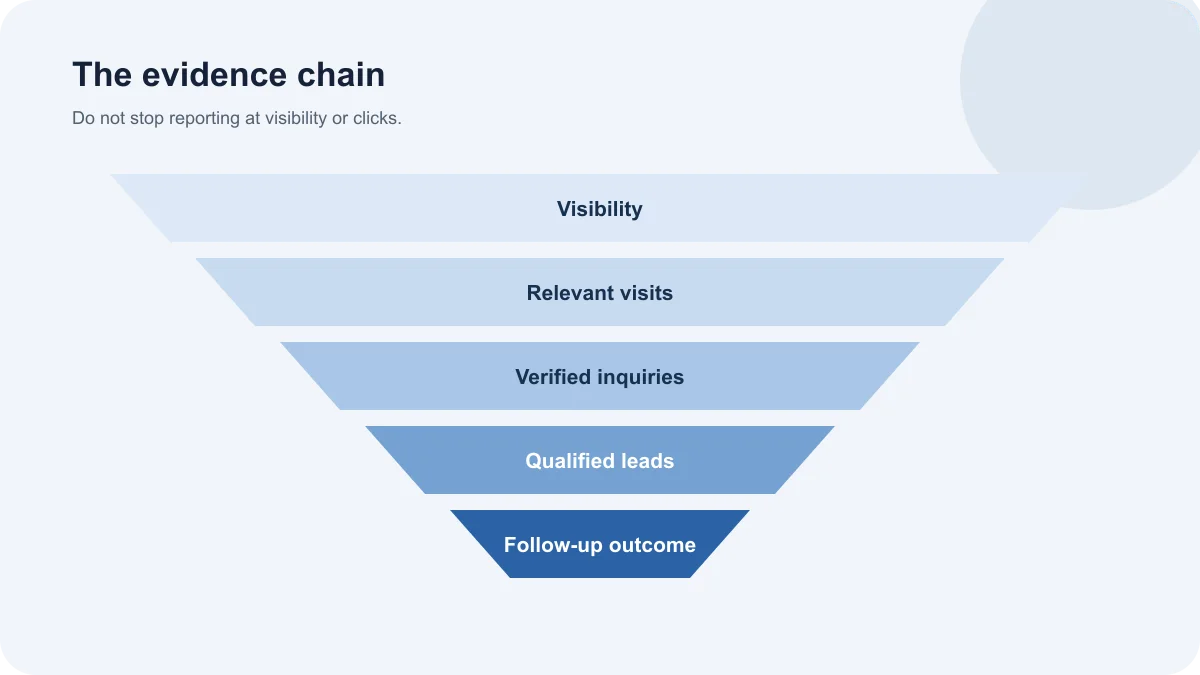
- Show the path from visibility to visit, inquiry, qualification, and follow-up.
- Separate platform conversions from leads that actually reached the team.
- Explain changes, limits, and decisions in plain language.
- End with accountable priorities, owners, and dates.
Digital marketing report for small business: what it should do
A digital marketing report is a decision document built from website, search, advertising, social, content, and sales evidence. The best format depends on the strategy. A local service business may care about calls, booking requests, direction actions, and service-area queries. An ecommerce business may need product views, checkout behavior, revenue, returns, and margin context.
The report should not pretend that every outcome can be attributed perfectly. Consent, device changes, offline conversations, call handling, CRM gaps, and long sales cycles can all limit measurement.
A digital marketing report for small business teams should state those limits clearly while still identifying the next useful decision.
1. Restate the goal and measurement rules
Begin with the result the business is trying to improve. Examples include qualified consultations, appointment requests, ecommerce purchases, or suitable recruitment inquiries.
Document:
- The primary outcome
- The definition of a qualified lead
- The reporting period and comparison period
- Material campaign or website changes
- Known data gaps
- The person responsible for validating lead quality
When the definition changes, historical comparisons need context. A lower lead count can be an improvement if spam and irrelevant inquiries were removed.
2. Show the customer path, not isolated channels
Marketing channels interact. A potential customer may discover the brand through social content, search the business name later, read a service page, and call after seeing reviews. Last-click reporting can understate earlier steps.
A practical report should organize evidence into a path:
- Visibility: relevant search impressions, local discovery, ad reach, or content distribution
- Interest: visits to useful landing and service pages
- Action: calls, forms, messages, bookings, or purchases
- Qualification: fit, location, need, budget, and timing where appropriate
- Follow-up: response time, contacted status, opportunity, or reason lost
Digital marketing report for small business: search visibility
For organic search, include clicks, impressions, click-through rate, average position, indexed status, top pages, and relevant queries. Avoid celebrating a position change without checking the query and page. Ranking first for an unrelated phrase is not a useful result.
The official Search Console performance documentation explains the platform’s clicks, impressions, CTR, and position measurements. Reports should also note that Search Console data can be aggregated and does not equal an exact real-time rank tracker.
Useful commentary might explain:
- A service page gained impressions but its title is not earning clicks
- A supporting article moved closer to page one for a buyer question
- A new page is indexed but has not yet developed demand
- Brand queries improved while non-brand visibility remained flat
Digital marketing report for small business: advertising and lead quality
For paid campaigns, show spend, impressions, clicks, conversion actions, cost per conversion, search terms or audience quality, landing pages, and qualified-lead outcomes. If call or CRM data is unavailable, say so.
Do not merge all conversion actions into one success number. A page view, button click, form start, submitted form, answered call, and sales-qualified lead have different values.
The Google Ads lead-generation guide explains why optimization should move beyond raw lead count.
5. Explain website and content performance
Identify which landing pages attract relevant visitors, assist inquiries, or create friction. Pageviews alone are not enough.
Review:
- Entry pages and the intent they serve
- Service-page engagement
- Contact-path completion
- Form errors and delivery failures
- Mobile and speed concerns
- Internal links into priority pages
- New and refreshed content
- Pages losing visibility or becoming outdated
The report should distinguish a traffic problem from a conversion problem. A page cannot convert visitors it never receives, but more traffic will not repair a broken form or unclear offer.
6. Include social and content evidence that matters
Report content reach and engagement only in relation to the purpose of the channel. Useful indicators can include saves, meaningful replies, profile visits, referral traffic, assisted inquiries, content reuse, and recurring customer questions.
Avoid turning follower growth into the headline when the business goal is qualified inquiries. Explain which messages, formats, or topics attracted the right audience and what should be tested next.
7. Reconcile analytics with the CRM or inbox
Platform dashboards can say “conversion” even when no usable lead reached the team. Each month, compare analytics events with form records, inbox messages, call logs, booking systems, and CRM entries.
Check:
- Did the form submission reach the destination?
- Was the phone call answered?
- Was the inquiry spam, irrelevant, or suitable?
- Which campaign and landing page influenced it?
- Was the lead contacted within the expected time?
- Why did qualified opportunities progress or stop?
Use the contact-form and GA4 checklist when the numbers do not reconcile.
8. Turn findings into decisions
A report should end with a short action register, not another chart. For every priority, name the evidence, decision, owner, due date, and expected measurement.
Examples:
- Rewrite the title of a high-impression, low-CTR page
- Exclude irrelevant paid-search terms
- Repair a form notification failure
- Strengthen internal links into a service page
- Interview the sales team about recurring lead-quality problems
- Stop producing a content format that attracts the wrong audience
Digital marketing report for small business: questions to answer
- Are more of the right people finding the business?
- Can they understand the offer and take the next step?
- Are inquiries reaching the team?
- Which channels influence qualified conversations?
- What changed during the reporting period?
- What evidence is still missing?
- What are the next three priorities?
Digital marketing report for small business: warning signs
Investigate reports that:
- Emphasize volume without relevance
- Combine different conversion actions into one number
- Exclude advertising spend or external costs
- Never mention lead quality or sales feedback
- Use screenshots without interpretation
- Hide weak results rather than explaining them
- Repeat the same recommendation every month
- Provide no owner or due date for next steps
Frequently asked questions
How often should a small business receive a marketing report?
Monthly reporting is a practical baseline for many programs, supported by faster alerts for urgent advertising, website, or tracking problems. The cadence should match decision speed and data volume.
What is the most important marketing KPI?
There is no universal KPI. For a service business, qualified inquiries may be the primary outcome, supported by visibility, visits, contact actions, and lead disposition.
Should every channel have the same metrics?
No. Search, advertising, email, social content, and websites play different roles. Use channel-appropriate measures while connecting them to the same business journey.
Why do analytics and CRM lead counts differ?
Tracking failures, consent choices, duplicate events, spam, offline activity, call handling, and integration gaps can create differences. Reconciliation should be part of reporting.
Should the report include recommendations?
Yes. Findings without decisions create little value. Recommendations should be prioritized, evidence-based, assigned, and reviewed in the next reporting cycle.
Make reporting an operating conversation
Rightjob Solutions’ Digital Marketing services are designed around coordinated visibility and a clearer path to qualified inquiries. Reporting should make that system easier to manage.
Start with a Digital Visibility Diagnostic to identify the measurement gaps and priorities that matter most to your business.