
Measuring AI search performance in Search Console requires more than watching website clicks. Google’s generative-AI reports can show where pages appear in AI features, while business analytics reveal whether that visibility contributes to qualified visits, branded demand, enquiries, or sales. The useful question is not simply “Did AI send traffic?” but “Which content earned visibility, for which audience, and what happened afterward?”
AI search performance in Search Console: quick answer
Use the dedicated generative-AI report when it is available to your property. Review impressions, appearing pages, countries, devices, and changes over time. Compare those signals with ordinary Search performance, landing-page engagement, conversions, and lead quality. Do not estimate an AI ranking from a single screenshot or treat every impression as a click opportunity.
TL;DR
- Google is rolling out dedicated generative-AI performance views to selected properties.
- Start with impressions, pages, countries, devices, and dates.
- Segment pages by business purpose, not just by URL.
- Compare AI visibility with branded searches and qualified conversions.
- Use annotations for major content, technical, or campaign changes.
- Availability and metrics can change during a staged rollout.

What Google’s generative-AI reports measure
Google announced dedicated Search Console reporting for visibility within generative-AI features in Search and Discover. Its initial report includes impressions, pages, countries, devices for Search results, and time-based views. The data remains part of the broader performance picture, but the dedicated view helps site owners isolate generative-AI exposure where the report is available.
The report should sit beside the standard Search Console performance workflow, not replace it. Traditional query, page, indexing, and technical signals still provide the operating context for any AI-specific visibility trend.
An impression means a URL from the site appeared within the relevant feature under Google’s reporting rules. It does not prove that the user read the cited passage, noticed the brand, visited the page, or became a lead. Treat the report as evidence of visibility—not a complete attribution system.
Confirm whether the report is available
Search Console features often roll out gradually. Check the property selector, performance navigation, and announcements shown inside the account. If the dedicated view is absent, continue using the standard Performance report and your existing analytics rather than installing an unofficial tracker that promises data Google has not exposed.
Record the date when a new report first becomes available. Historical coverage, filters, and definitions may differ during testing. This prevents a reporting-interface change from being mistaken for a sudden change in demand.
Start with the pages that appear
Group visible URLs into useful business categories:
- service and location pages;
- buyer guides and comparison articles;
- checklists and how-to content;
- original research, case studies, and evidence pages;
- company, author, and trust pages;
- outdated or low-priority pages.
This makes the report actionable. If only broad informational articles appear, the site may need stronger connections between those articles and relevant service pages. If important service pages appear but receive weak engagement, the message or next step may need work.
Compare countries and devices
Country data helps determine whether visibility matches the markets the business can serve. A Philippine agency may attract readers in the United States or Australia, but the page must clearly explain delivery model, time-zone coverage, scope, and conversion path for those buyers.
Device data can expose experience problems. If mobile visibility grows while mobile enquiries remain weak, review page speed, intrusive overlays, navigation, form usability, tap targets, and the clarity of the first screen. Do not blame AI traffic before testing the landing experience.
Track trends, not isolated days
Use weekly and monthly comparisons for strategic decisions. Short windows are helpful for detecting a new article, event, or sudden change, but AI visibility can fluctuate with query demand and feature presentation.
Annotate meaningful events:
- publication or substantial content refresh;
- title, internal-link, or structured-data changes;
- migration, redesign, or technical incident;
- major campaign launch;
- change to conversion tracking;
- important Google documentation or product update.
Without annotations, teams often invent explanations after the fact.
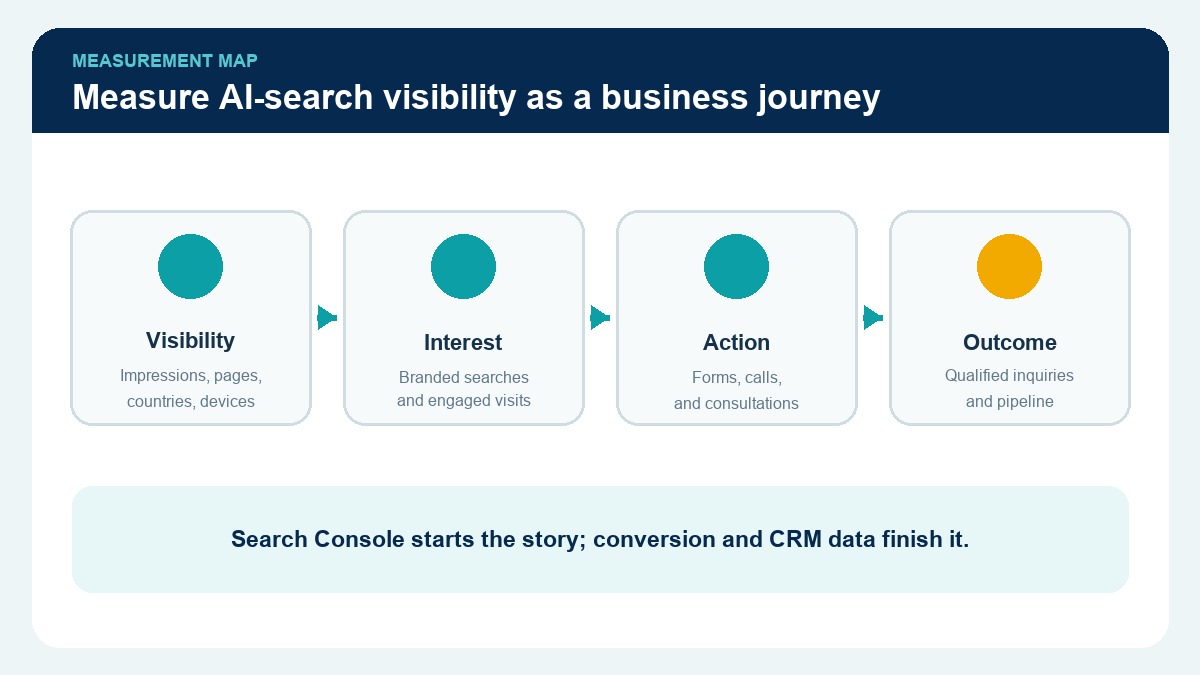
Connect visibility to business outcomes
Search Console cannot determine whether a lead is qualified for RightJob Solutions. Connect landing-page sessions with GA4, form or call records, CRM stages, and sales feedback.
Use a simple ladder:
- AI-feature impression
- website visit or branded follow-up search
- engaged visit to a relevant page
- contact attempt
- qualified enquiry
- booked conversation
- customer or accepted opportunity
Not every impression must produce a direct click to be valuable. A person may remember the business name and return later. That makes branded-query trends and assisted conversions useful—but they should be described as supporting evidence, not proof of causation.
Build a monthly AI-search scorecard
Keep the scorecard small enough to review consistently:
- total generative-AI impressions;
- top appearing pages;
- visibility by target country;
- mobile versus desktop exposure;
- branded Search impressions and clicks;
- organic entrances to the appearing pages;
- enquiries assisted by those pages;
- qualified-lead rate;
- actions completed during the month.
Pair each metric with a decision. A dashboard that cannot change content, technical work, conversion design, or follow-up priorities is only decoration.

Common reporting mistakes
Avoid these conclusions:
- “More impressions mean we rank first in AI.”
- “Fewer clicks mean the content failed.”
- “A citation guarantees future visibility.”
- “One third-party crawler measures every AI answer.”
- “Traffic from an appearing page was caused entirely by an AI feature.”
Instead, state what the data directly shows, identify what remains unknown, and choose a test that can reduce the uncertainty.
For the broader strategy, use RightJob’s AI search visibility checklist and our guide to SEO, AEO, and GEO.
Frequently Asked Questions
Does Search Console show AI Overview and AI Mode performance?
Google has announced dedicated generative-AI reporting for selected properties and says related data remains part of the overall performance picture. Check current availability inside your property.
Can I see the exact AI answer that mentioned my page?
The announced report focuses on aggregated performance dimensions such as impressions, pages, countries, devices, and dates. Do not assume it provides a permanent archive of every generated response.
What is the best AI-search KPI?
There is no single KPI. Combine eligible visibility with target-market relevance, engaged visits, qualified enquiries, and commercial outcomes.
Should I buy a separate AI visibility tool?
Only after defining the question the tool must answer, its source coverage, and how its data will influence decisions. Search Console and business analytics should remain foundational evidence.
Can RightJob Solutions build this reporting workflow?
Yes. RightJob Solutions can connect search visibility, website analytics, conversion paths, and lead-quality reporting. Explore our digital marketing services or book a consultation.
Final takeaway
AI-search reporting is most useful when it connects visibility to content purpose and qualified business outcomes. Start with Google’s available dimensions, preserve context with annotations, and avoid turning incomplete data into a certainty claim.
The goal is a repeatable decision system: understand where the brand appears, improve the pages that matter, and measure what qualified buyers do next.
Editorial source note: Based on Google’s June 3, 2026 announcement for generative-AI performance reporting. Recheck report availability and metric definitions before publication and during quarterly reviews.